Pages

Monday, April 27, 2009

Magecamp

Starting tomorrow I'll be attending Mage::Camp... I'll have to register first for my VIP pass, hope that does not take long...

My agenda includes the Keynote speech from Varien (Roy Rubin), Magento Enterprise Edition and I'll see maybe some Internet World sessions...

Magento Enterprise Edition is a platform with great potential to cover the needs of a medium/large e-tail company... I have in mind a lot of eCommerce companies in Romania that would benefit from that, lower TCO, better change management and more features for their front end ...

Also, offline retailers could benefit from promoting at least their products in an online environment, attracting new customers and so on...

I'd like to see Mobexpert, which now uses oscommerce based solution just for a catalog... or Bricostore, Praktiker, and so on using a solution that can offer lots of functionalities for getting the most out of their promotions, bundles, cross-selling, up-selling, etc...

I'll post some more opinions during tomorrow... So stay tuned...

Sunday, April 05, 2009

PHP Frameworks: CodeIgniter

CodeIgniter is a php web development framework... In its own words:
CodeIgniter is a powerful PHP framework with a very small footprint, built for PHP coders who need a simple and elegant toolkit to create full-featured web applications. If you're a developer who lives in the real world of shared hosting accounts and clients with deadlines, and if you're tired of ponderously large and thoroughly undocumented frameworks
Instead of a web development framework I'd rather call it a collections of libraries that help you in developing a web application... I should continue with "easier" but is not actually like that, beacause "easier" for me means in the first place faster... The MVC pattern that tries to cover is actually going with some best practices and that's it... First time I tried CodeIgniter was at the recommendation of a fellow that was using CodeIgniter and was very happy with it... I tried to build a backend application for quote management, but I gave up and used a framework inspired by CakePHP, but quite truncated with a very good ORM... That was an unhappy experience and left CodeIgniter, and started using more and more CakePHP... The main reason I didn't continue with CodeIgniter was that I had to write lots of code... for everything I need I had to write code... And that's not helpful.. And after a year or so, at our company I got a very nice customer that was quite good four our image and decent pay... We already had a name, couple of large (national and multi-national companies) in out portfolio The code of the website was in 2 controllers (8k and 12k code code, yes that's 8.000 and 12.000 lines of code) and 2 views (the container of html code)... Of course CodeIgniter was used... They had no idea what they were doing in there....
class Start extends Controller {

function funcNameHere($paramx=''){
#code here
$data['content_html'] = 'html code here..';
#sql queries and stuff here... no models used...
#loops here to build the content
$this->load->view('main_view', $data);
}
#other 1000 functions here
}
So it's not at all easy to deal with this... But, without some extra-functionalities needed the application was working... Anyway, instead of rewriting the entire app, we just moved to a proper approach only the modules that needed to be changed... Details in another story maybe... This was another proof that using a Web Development Framework does not actually means writing quality code... My conclusions about CodeIgniter so far:
  • is a collection of libraries for developing web applications
  • not a RAD framework
  • too much code needed to be written
  • good documentation
  • lacks AJAX library
  • low complexity and easy to learn
  • weak ORM
So, a beginner that wants to use a framework, can start with CodeIgniter or if you need more control over your application also you can use CodeIgniter... I will be involved in projects that are built with CodeIgniter only if it's a requirement or it's easier than using something else. I prefer CakePHP (web applications development) and Zend Framework (as a toolkit)...

Sunday, February 15, 2009

CakePHP: model without a database table

In my previous post I wrote about CakePHP controller without a model... But is not the most fortunate approach because you will have to process some data that should be in the model logic... So, instead of eliminating the model, just make a model class that does not require a database table:
class ChartsController extends AppController
{
var $name='Charts';
function index() {
 //code goes here
}
}
and the model:
class Chart extends AppModel
{
var $name = 'Chart';
var $useTable = false;
}
Setting the $useTable property to false is all you need to do...

Web Development PHP Frameworks News

I updated the Yahoo Pipes badge on the right column with the rss feed from Web Development PHP Frameworks Pipe. All the articles from CakePHP bakery were not well processed so I fixed that... Now you can watch these 4 main PHP frameworks in one place:
  • CakePHP
  • Symfony
  • Zend Framework
  • Code Igniter
Feel free to add any requests to this feed...

Tuesday, January 06, 2009

CakePHP: controller without models

How to create a controller without models. When you don't specify anything in a controller: Error: Database table tableName for model modelName was not found. So, you can do this:
class PagesController extends AppController {
  var $name = 'Pages';
  var $uses = array();#this controller uses no models...
}
And now you can edit your views and that's it...

Magento 1.2.0.1 - small fixes from 1.2

After announcing the release of Magento 1.2, version 1.2.0.1 was already announced one day later (30 december)... Release notes for version 1.2.0.1:
  • Fixed checking customer ID in download controller
  • Fixed “Incorrect table name…” SQL error during upgrade on some MySQL versions
In Magento 1.2 the highlights were:

  • Added downlodable product type
  • Implemented fulltext search
  • Added layered navigation to search results
  • Added option to disable Google checkout for selected products
  • Added fixed amount product taxes
  • Upgraded ZF library to version 1.7.2

Monday, January 05, 2009

What happened meanwhile...

Well, I got back from UK... KLM lost my luggage... So today I'm recovering them... Had my shoppings in there... suits, shirts and other stuff from M&S... Today I started a bit late, like at 4pm...:D This week I won't be able to write so often, but keep close because until next week I will publish more chapters on ZF Tutorials, Magento and other web frameworks... Happy New Year!!!

Wednesday, December 31, 2008

CodeIgniter rss powered by Zend Framework Zend_Feed

In a recently project that we had to finish (started by a different company, went for two years and wasn't finished yet) we handled with a lot of legacy code which used CodeIgniter as a web development framework...

Refactoring it is another discussion because it's a nice case study how not to generate html code in your controller (which containes over 12.000 lines of code - it's a right figure, we still have in svn the original file) and the entire application has 2 controllers - 12k lines of code x 2 (one for frontend and one for backend) and 2 views (pretty cool eh?).

Delivering fast results means no time rewrite an entire application... A nice feature we added is rss feeds. For that we used Zend Framework component Zend_Feed embeded in a CodeIgniter controller... Application structure is:

/
/system
/system/application
/system/application/controllers
/system/codeigniter
[...]
/Zend
/Zend/Feed
.htaccess
index.php

We included in the Zend folder only Zend_Feed and dependencies for this job... Tried to use a Package Maker for Zend Framework, but it does not seem to work (did not included EmailValidation and so on...) Setting up include_path: In index.php add the following line:

set_include_path(getcwd().PATH_SEPARATOR.'.');
So when you call require_once 'Zend/something' - will work.
class Rss extends Controller {

function Rss() {   
   parent::Controller();
   $this->load->helper('text');
   $lang = $this->phpsession->get('lang');
   if(empty($lang)){
       $lang = 'ro';
   }
//...
}

/**
* last 10 news
*
*/
function news()
{

   #load up zend feed
   require_once 'Zend/Feed.php';
   $array = array(
       'title'       => 'FEED TITLE HERE', //required
       'link'        => $_SERVER['REQUEST_URI'], //required
       'lastUpdate'  => time(), // optional
       'published'   => time(), //optional
       'charset'     => 'utf8', // required
       'description' => 'COMPANY NAME news feed', //optional
       'author'      => 'COMPANY NAME', //optional
       'email'       => 'office@example.com', //optional
       'webmaster'   => 'office@example.com',
       'copyright'   => 'All rights reserved COMPANY NAME', //optional
       'image'       => 'http://www.example.com/logo.gif', //optional
       'generator'   => 'myZFeed', // optional
       'ttl'         => '60'
   );


   $fields = array('title','short_descr','descr');
   $lang       = $this->phpsession->get('lang');   
   if($lang=='en'){
       //smart piece of code :)
       $sql_select_fields = array_reduce($fields,create_function('$v,$a','$a .= \'_en as \'.$a;$v.=\',\'.$a; return $v;'));
   } else {
       $sql_select_fields = ','.implode(',',$fields);
   }

   //table name, news in Romanian
   $table = 'noutati';
   $limit = 10;   
   $this->db->select('id '.$sql_select_fields.', UNIX_TIMESTAMP(dt) as rss_timestamp');
   $this->db->where('visible',1);
   $this->db->order_by("dt", "desc");
   $query = $this->db->get($table,$limit);
   foreach ($query->result() as $row){

       $array['entries'][]     = array(
           'title'        => $row->title, //required
           'link'         => $this->config->config['base_url'].'/start/news_details/'.$row->id,
           'description'  => word_limiter($row->short_descr, 20),
           'content'      => $row->descr,
           'lastUpdate'   => $row->rss_timestamp
       );
   }

   $rssFeedFromArray = Zend_Feed::importArray($array, 'rss');
   $rssFeedFromArray->send();
}

}
That's it. Now you have a working rss feed in a CodeIgniter application powered by Zend_Feed :) Session is opened to questions :). Note: will not share the 12k lines of code file... Not sure about copyright and stuff....

Tuesday, December 30, 2008

Zend Framework - disable layout and view rendering

I wanted to add rss to a list of items for the todo list application. I used Zend_Feed for creating the rss... But, my application has a layout and a view and I needed to disable layout and view. This solves it:

public function rssAction()
{
#disable layout     
$this->_helper->layout()->disableLayout();

#disable view rendering
$this->_helper->viewRenderer->setNoRender();
//other stuff here
}

Zend Framework Quickstart Tutorial - Todo List - MySQL version - part 1

Making a screencast takes me awful lots of time so instead I find easier to follow a tutorial written with screenshots and code samples.

0. Introduction

The main idea is to create a todo list application using Zend Framework with the following features:

  • todo lists (eg: Grocery list, chores, daily naps, etc.)
  • each lists can have todo items
  • each item can be active/done
  • mark items as done or delete them

That's about it.

0.1 Installing Zend Framework

I downloaded the 1.7.2 version of Zend Framework and unzip it in ../htdocs/ZendFramework-1.7.2
I edited my php.ini file so I have Zend Framework path in include_path:
include_path = ".;C:\web\Apache2.2\htdocs\ZendFramework-1.7.2\library"
If you are on a Unix platform, instead of ; use : as a separator.
Now, I can use:
require_once "Zend/Loader.php";
without using set_include_path()
1. Application structure My php5 development env is on a Windows Vista and my htdocs directory is located: C:\web\Apache2.2\htdocs
1.1 Create a new folder: zftodo
Create a new folder: zftodo in your htdocs directory.
1.2 Checkout the app structure from google code
svn checkout http://zfquickstartmysql.googlecode.com/svn/trunk/zftodo-start zfquickstartmysql-read-only
2. Creating database and granting access In scripts directory you will find a file: db.mysql.sql If you have privileges for creating a new database and granting access run that sql. If you don't have privileges for doing that, skip that and change application/config/app.ini:
[development]
database.adapter       = "PDO_MYSQL"
database.params.host   = "db host here"
database.params.username   = "db username here"
database.params.password   = "db password here"
database.params.dbname = "db name here"
3. Test your application Open your browser and go to the following url: http://localhost/zftodo/public/ (or change it depending on your web server configuration).
You'll see the following message:
Hello, from the Zend Framework MVC!
    I am the index controllers's view script. 
To change the contents you can edit:
  • application/layouts/scripts/layout.phtml (for the layout)
  • application/views/scripts/index/index.phtml (for index contents)

Now you are all set and we can proceed to part 2 of the tutorial where we actually get something working :)

Monday, December 29, 2008

PHP Framework trends - Zend Framework vs Symfony vs CakePHP vs CodeIgniter

This graph is for the last 12 months Google trends Zend Framework vs Symfony vs CakePHP vs CodeIgniter
zend framework
1.00
symfony
1.14
cakephp
1.35
codeigniter
0.50

Sunday, December 28, 2008

How to add syntax highlighting to you blogger.com blog

For syntax highlighting I chose the project: SyntaxHighlighter After you log in to your account, go to Layout -> Edit Html At the end of css declaration add the css from svn trunk as shown in the image above. Next, go to the end of your template html, and add the following code:
//these are src for script language javascript tag which I cannot write here:
http://syntaxhighlighter.googlecode.com/svn/trunk/Scripts/shCore.js
http://syntaxhighlighter.googlecode.com/svn/trunk/Scripts/shBrushPhp.js
http://syntaxhighlighter.googlecode.com/svn/trunk/Scripts/shBrushSql.js
http://syntaxhighlighter.googlecode.com/svn/trunk/Scripts/shBrushCss.js
http://syntaxhighlighter.googlecode.com/svn/trunk/Scripts/shBrushJScript.js
http://syntaxhighlighter.googlecode.com/svn/trunk/Scripts/shBrushPython.js

//wrap this in a script tag
dp.SyntaxHighlighter.ClipboardSwf ='http://syntaxhighlighter.googlecode.com/svn/trunk/Scripts/clipboard.swf';
dp.SyntaxHighlighter.HighlightAll('code');

Scripts in html documents And here is a sample php usage:
$var = 'Sample usage';
#comment here

Zend Framework Quickstart - MySQL version

As you might noticed, Magento platform is built on top of Zend Framework. Recently released 1.2 version of Magento eCommerce Platform includes Zend Framework 1.7.2. Zend Framework Quickstart is a good place to start getting an idea about using ZF to build applications. I wrote earlier about installing Magento from svn. The next steps include creating a custom module (todo list, a guestbook something simple for an introduction in creating a custom module for Magento) and connecting Magento with 3rd party applications. I have the following structure on my laptop that I use for development: htdocs is in
C:\web\Apache2.2\htdocs
Zend Framework library:
C:\web\Apache2.2\htdocs\ZendFramework-1.7.2\library
and I've set in php.ini:
include_path = ".;c:\php\includes;C:\web\Apache2.2\htdocs\ZendFramework-1.7.2\library"
1. Create a folder and unzip Quickstart sample application in that folder:
C:\web\Apache2.2\htdocs\zfquickstart #in my case
2. Setup application paths Because you will not build a single application with ZF I don't see a good idea in including ZF within each application (that library folder in sample application folder). I keep it outside in htdocs and I've setup in php.ini include_path so I won't need to override include_path using set_include_path... So, if you want to change include_path in your php.ini you can do that. Or you can change index.php:
#set_include_path(APPLICATION_PATH . '/../library' . PATH_SEPARATOR .get_include_path());
set_include_path('C:/web/Apache2.2/htdocs/ZendFramework-1.7.2/library'.PATH_SEPARATOR . get_include_path());
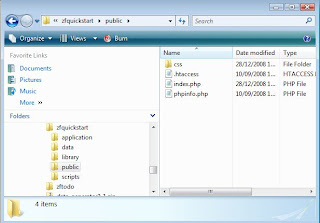
So start your browser and go to: http://localhost/zfquickstart/public/ You will see a success message from IndexController:
Hello, from the Zend Framework MVC!
I am the index controllers's view script.
View file is application/scripts/index/index.phtml Another thing that we need to fix is the base url, because css file for example is included as /css/global.css and we are in /zfquickstart/public/ and the correct path should be /zfquickstart/public/css/global.css There are many ways to solve that, using Zend_Router and so on... In bootstrap.php find:

$frontController->setControllerDirectory(APPLICATION_PATH . '/controllers');
#add this (you can create a piece of code to extract this from url):
$frontController->setBaseUrl('/zfquickstart/public');
#also find:
$view = Zend_Layout::getMvcInstance()->getView();
$view->doctype('XHTML1_STRICT');
#and add this line
$view->baseUrl = Zend_Controller_Front::getInstance()->getBaseUrl();
and in layouts/scripts/layout.phtml:
headLink()->appendStylesheet($this->baseUrl.'/css/global.css') ?>
And now you have a nice css added to your layout. Now open public/.htaccess and replace:
RewriteRule ^.*$ /index.php [NC,L]
#with
RewriteRule ^.*$ index.php [NC,L]
3. Setting up database for Zend Framework QuickStart application - MySQL version Create database and grant access:
create database zfquickstart;
grant all on zfquickstart.* to 'zfquickstart'@'localhost' identified by 'zfquickstart';
flush privileges;
schema.mysql.sql:
CREATE TABLE `zfquickstart`.`guestbook`(
`id` INT (8) UNSIGNED NOT NULL AUTO_INCREMENT,
`email` VARCHAR (50),
`comment` TEXT,
`created` DATETIME,
PRIMARY KEY(`id`)
) TYPE = MyISAM;
data.mysql.sql

INSERT INTO guestbook (email, comment, created) VALUES
('email.email@zendfoo.com', 'Hello! Hope you enjoy this sample zf application!', NOW());
INSERT INTO guestbook (email, comment, created) VALUES
('foo@bar.com', 'Baz baz baz, baz baz Baz baz baz - baz baz baz.', NOW());
You can run the above sql with phpmyadmin/some mysql gui... or you can create a version for load.mysql.php in scripts folder to load this sql intro database... Now, setting up config. In application/config/app.ini, add this section:
[development]
database.adapter       = "PDO_MYSQL"
database.params.host   = "localhost"
database.params.username   = "zfquickstart"
database.params.password   = "zfquickstart"
database.params.dbname = "zfquickstart"
Note: in bootstrap.php the environment is development:
defined('APPLICATION_ENVIRONMENT')
 or define('APPLICATION_ENVIRONMENT', 'development');
That's it for now... Next episode: Creating a todo list application with Zend Framework

Friday, December 26, 2008

Magento 1.2 Alpha is available on SVN

Magento just published on twitter and their blog the Magento 1.2 alpha availability on SVN. List of changes in Magento 1.2 is also available. Fixed stuff regarding i18n and layout, calculations, taxes and so on... Also ZF is upgraded to 1.7.2... A new feature is: downloadable products (a sneak peak was published a few days ago on Magento's blog: Sneak Peek: Downloadable Products in Magento 1.2); another feature is the fulltext search... Being an alpha version we will see more changes in the near future... I eagerly expect fixes in documentation, wiki urls and so on, because it looks totally unprofessional to see recommended articles on Wiki linked to pages that do not exist (eg: lightbox integration article - now is features but the page is empty in wiki), incomplete documentation and so on... Happy Holidays!

Thursday, December 25, 2008

Installing Magento from SVN

On Magento website, go to Downloads -> SVN. Current version is Magento 1.1. To svn checkout (latest stable):
svn checkout http://svn.magentocommerce.com/source/branches/1.1
Create a folder in htdocs magento11 an checkout using a svn client (Tortoise svn for windows is really nice). If you have a webserver installed on your system, acces:
http://localhost/magento11/
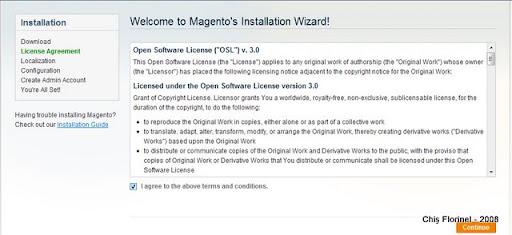
Automatically you will be redirected to install: Make sure you have mod_rewrite enabled, and Allow override so Magento's .htaccess file can override some configs. 1. First step in installing Magento is to agree terms and conditions:
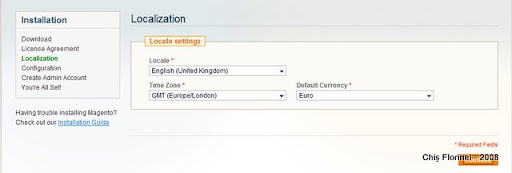
2. Localization (note: I can't seem to find UK Pound in the list):

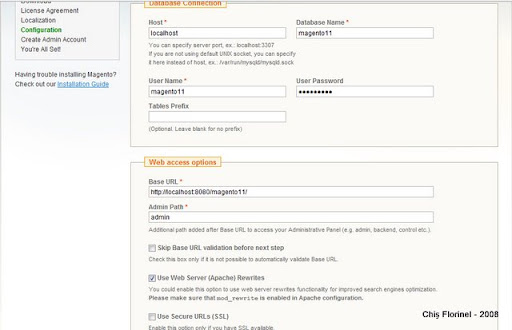
3. Database connection and Web access options: Make sure you provide a valid account for MySQL.
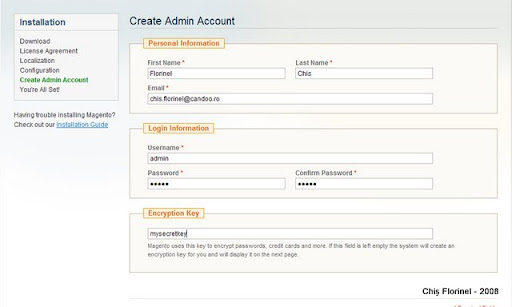
4. Personal Information, Login Information and Encryption Key:
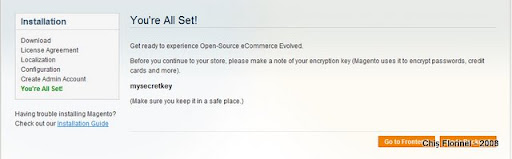
5. You are all set!

Magento introduction

I followed Magento progress from the beginning. I decided to write a series of tutorials referring for the first chapter to importing and connecting Magento to other systems... Magento API allows interaction through SOAP and XML RPC protocols. Most entities covered, so you can use the API to import/export Customers, Products, Invoices and so on... If you have an ERP system already with your products defined there and you want to expose some of them to web and sell them online (e-commerce website), well, that's what you need. Magento API is permission based, so you need to define users and roles... Also keys for accessing the web service. The authentication part looks like this:

$proxy = new SoapClient('http://mymagento.localhost/api/soap/?wsdl');
$sessionId = $proxy->login('api-user', 'your-api-key-here');
First we talk about this autentication part and then we shall import and export some products, customers maybe interaction with an open source CRM like vTiger and Sugar CRM.

Tuesday, December 23, 2008

I'm in UK for holidays...

This year is almost over... So on 23rd I'm going to Uk's airport Heathrow with a stop in Amsterdam... I will post my New Year's Resolution at a later time... Right now, I still have one more day to work and pack my bags... I also have to take care of 2 Christmas trees (home and office)...

Thursday, November 13, 2008

Convergence 2008 - Copenhagen, Denmark

This year is my second time I'm attending Microsoft Convergence in Copenhagen, Denmark. Executive Speakers are Jeff Raikes (whom I met last year, had the change to clarify with him some issues) and Kirill Tatarinov. Sessions will cover ERP discussions (AX, NAV, GP, SL), CRM, BI, Office, etc. For an upcoming project that Candoo will develop in 2009 (whole year) I'm very interested in SaaS solutions for ERP/CRM and Office Live. So, Meet me @ Microsoft Convergence 2008 in Copenhagen, Denmark :)

Friday, October 24, 2008

OpenVPN and Windows Vista updates - autentication with username and password

Because the server guys changed some stuff for the OpenVPN, I was unable to connect ... Uninstalled and installed a new version (stable)... Did not work for me... I have Windows Vista Home Premium installed on my laptop so I don't know if is relevant... Uninstalling the OpenVPN did not go as planned, beacause the TAP adapter remained... Anyway, the solution seems to be the recenly Release Candidate: OpenVPN 2.1_rc13 -- released on 2008.10.09 [download Windows Installer] Now I use OpenVPN without a key, with username and password...

Sunday, October 19, 2008

Fetch urls anonymously with Python urllib2 and Tor

For various purposes (web scrapping, spiders, data extraction, etc) you need to use anonimity... 1. Install Tor 2. Check if Tor is working 3. Write your script in Python
import urllib2
proxy_support = urllib2.ProxyHandler({"http":"http://127.0.0.1:8118"})
opener = urllib2.build_opener(proxy_support)
url='http://whatismyip.com/'
page = opener.open(url)
contents=page.read()
print contents

And that is all

For web scrapping you can use Beautiful Soup. Adding some Beautiful Soup:
import re
from BeautifulSoup import BeautifulSoup
soup = BeautifulSoup(page)
h1Tags = soup.findAll('h1')
#ip address text is in a 2nd h1 tag:
ip = re.sub(r'<[^>]*?>', '', str(h1Tag[1]))
print ip
If you want to see some readable text, see the page source, there is a comment about which url you can access to see only the IP address...