Showing posts with label Zend Framework. Show all posts
Showing posts with label Zend Framework. Show all posts
Friday, November 06, 2009
Zend Framework 1.9.5 was released
Two weeks after Zend Framework 1.9.4 was released, Zend Framework 1.9.5 is available for download.
Changelog contains mostly bug fixes and minor changes...
Still waiting for 2.0 version :)


Wednesday, December 31, 2008
CodeIgniter rss powered by Zend Framework Zend_Feed
In a recently project that we had to finish (started by a different company, went for two years and wasn't finished yet) we handled with a lot of legacy code which used CodeIgniter as a web development framework...
Refactoring it is another discussion because it's a nice case study how not to generate html code in your controller (which containes over 12.000 lines of code - it's a right figure, we still have in svn the original file) and the entire application has 2 controllers - 12k lines of code x 2 (one for frontend and one for backend) and 2 views (pretty cool eh?).
Delivering fast results means no time rewrite an entire application... A nice feature we added is rss feeds. For that we used Zend Framework component Zend_Feed embeded in a CodeIgniter controller... Application structure is:
/
/system
/system/application
/system/application/controllers
/system/codeigniter
[...]
/Zend
/Zend/Feed
.htaccess
index.php
We included in the Zend folder only Zend_Feed and dependencies for this job... Tried to use a Package Maker for Zend Framework, but it does not seem to work (did not included EmailValidation and so on...) Setting up include_path: In index.php add the following line:
set_include_path(getcwd().PATH_SEPARATOR.'.');So when you call require_once 'Zend/something' - will work.
class Rss extends Controller {

function Rss() {
   parent::Controller();
   $this->load->helper('text');
   $lang = $this->phpsession->get('lang');
   if(empty($lang)){
       $lang = 'ro';
   }
//...
}

/**
* last 10 news
*
*/
function news()
{

   #load up zend feed
   require_once 'Zend/Feed.php';
   $array = array(
       'title'       => 'FEED TITLE HERE', //required
       'link'        => $_SERVER['REQUEST_URI'], //required
       'lastUpdate'  => time(), // optional
       'published'   => time(), //optional
       'charset'     => 'utf8', // required
       'description' => 'COMPANY NAME news feed', //optional
       'author'      => 'COMPANY NAME', //optional
       'email'       => 'office@example.com', //optional
       'webmaster'   => 'office@example.com',
       'copyright'   => 'All rights reserved COMPANY NAME', //optional
       'image'       => 'http://www.example.com/logo.gif', //optional
       'generator'   => 'myZFeed', // optional
       'ttl'         => '60'
   );


   $fields = array('title','short_descr','descr');
   $lang       = $this->phpsession->get('lang');
   if($lang=='en'){
       //smart piece of code :)
       $sql_select_fields = array_reduce($fields,create_function('$v,$a','$a .= \'_en as \'.$a;$v.=\',\'.$a; return $v;'));
   } else {
       $sql_select_fields = ','.implode(',',$fields);
   }

   //table name, news in Romanian
   $table = 'noutati';
   $limit = 10;
   $this->db->select('id '.$sql_select_fields.', UNIX_TIMESTAMP(dt) as rss_timestamp');
   $this->db->where('visible',1);
   $this->db->order_by("dt", "desc");
   $query = $this->db->get($table,$limit);
   foreach ($query->result() as $row){

       $array['entries'][]     = array(
           'title'        => $row->title, //required
           'link'         => $this->config->config['base_url'].'/start/news_details/'.$row->id,
           'description'  => word_limiter($row->short_descr, 20),
           'content'      => $row->descr,
           'lastUpdate'   => $row->rss_timestamp
       );
   }

   $rssFeedFromArray = Zend_Feed::importArray($array, 'rss');
   $rssFeedFromArray->send();
}

}
That's it. Now you have a working rss feed in a CodeIgniter application powered by Zend_Feed :)
Session is opened to questions :).
Note: will not share the 12k lines of code file... Not sure about copyright and stuff....
Tuesday, December 30, 2008
Zend Framework - disable layout and view rendering
I wanted to add rss to a list of items for the todo list application. I used Zend_Feed for creating the rss... But, my application has a layout and a view and I needed to disable layout and view. This solves it:
public function rssAction()
{
#disable layout
$this->_helper->layout()->disableLayout();

#disable view rendering
$this->_helper->viewRenderer->setNoRender();
//other stuff here
}
Zend Framework Quickstart Tutorial - Todo List - MySQL version - part 1
Making a screencast takes me awful lots of time so instead I find easier to follow a tutorial written with screenshots and code samples.
0. IntroductionThe main idea is to create a todo list application using Zend Framework with the following features:
- todo lists (eg: Grocery list, chores, daily naps, etc.)
- each lists can have todo items
- each item can be active/done
- mark items as done or delete them
0.1 Installing Zend Framework
I downloaded the 1.7.2 version of Zend Framework and unzip it in ../htdocs/ZendFramework-1.7.2I edited my php.ini file so I have Zend Framework path in include_path:
include_path = ".;C:\web\Apache2.2\htdocs\ZendFramework-1.7.2\library"If you are on a Unix platform, instead of ; use : as a separator.
Now, I can use:
require_once "Zend/Loader.php";without using set_include_path()
1. Application structure My php5 development env is on a Windows Vista and my htdocs directory is located: C:\web\Apache2.2\htdocs
1.1 Create a new folder: zftodo
Create a new folder: zftodo in your htdocs directory.
1.2 Checkout the app structure from google code
svn checkout http://zfquickstartmysql.googlecode.com/svn/trunk/zftodo-start zfquickstartmysql-read-only2. Creating database and granting access In scripts directory you will find a file: db.mysql.sql If you have privileges for creating a new database and granting access run that sql. If you don't have privileges for doing that, skip that and change application/config/app.ini:
[development]
database.adapter       = "PDO_MYSQL"
database.params.host   = "db host here"
database.params.username   = "db username here"
database.params.password   = "db password here"
database.params.dbname = "db name here"
3. Test your application Open your browser and go to the following url: http://localhost/zftodo/public/ (or change it depending on your web server configuration).
You'll see the following message:
Hello, from the Zend Framework MVC!
    I am the index controllers's view script.
To change the contents you can edit:
- application/layouts/scripts/layout.phtml (for the layout)
- application/views/scripts/index/index.phtml (for index contents)
Now you are all set and we can proceed to part 2 of the tutorial where we actually get something working :)
Monday, December 29, 2008
PHP Framework trends - Zend Framework vs Symfony vs CakePHP vs CodeIgniter
This graph is for the last 12 months
Google trends Zend Framework vs Symfony vs CakePHP vs CodeIgniter
| |||||||||||||||||
Sunday, December 28, 2008
Zend Framework Quickstart - MySQL version
As you might noticed, Magento platform is built on top of Zend Framework. Recently released 1.2 version of Magento eCommerce Platform includes Zend Framework 1.7.2.
Zend Framework Quickstart is a good place to start getting an idea about using ZF to build applications.
I wrote earlier about installing Magento from svn. The next steps include creating a custom module (todo list, a guestbook something simple for an introduction in creating a custom module for Magento) and connecting Magento with 3rd party applications.
I have the following structure on my laptop that I use for development:
htdocs is in 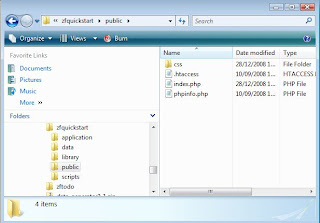 So start your browser and go to:
http://localhost/zfquickstart/public/
You will see a success message from IndexController:
So start your browser and go to:
http://localhost/zfquickstart/public/
You will see a success message from IndexController:
C:\web\Apache2.2\htdocsZend Framework library:
C:\web\Apache2.2\htdocs\ZendFramework-1.7.2\libraryand I've set in php.ini:
include_path = ".;c:\php\includes;C:\web\Apache2.2\htdocs\ZendFramework-1.7.2\library"1. Create a folder and unzip Quickstart sample application in that folder:
C:\web\Apache2.2\htdocs\zfquickstart #in my case2. Setup application paths Because you will not build a single application with ZF I don't see a good idea in including ZF within each application (that library folder in sample application folder). I keep it outside in htdocs and I've setup in php.ini include_path so I won't need to override include_path using set_include_path... So, if you want to change include_path in your php.ini you can do that. Or you can change index.php:
#set_include_path(APPLICATION_PATH . '/../library' . PATH_SEPARATOR .get_include_path());
set_include_path('C:/web/Apache2.2/htdocs/ZendFramework-1.7.2/library'.PATH_SEPARATOR . get_include_path());
 So start your browser and go to:
http://localhost/zfquickstart/public/
You will see a success message from IndexController:
So start your browser and go to:
http://localhost/zfquickstart/public/
You will see a success message from IndexController:
Hello, from the Zend Framework MVC!
I am the index controllers's view script.
View file is application/scripts/index/index.phtml Another thing that we need to fix is the base url, because css file for example is included as /css/global.css and we are in /zfquickstart/public/ and the correct path should be /zfquickstart/public/css/global.css There are many ways to solve that, using Zend_Router and so on... In bootstrap.php find:
$frontController->setControllerDirectory(APPLICATION_PATH . '/controllers');
#add this (you can create a piece of code to extract this from url):
$frontController->setBaseUrl('/zfquickstart/public');
#also find:
$view = Zend_Layout::getMvcInstance()->getView();
$view->doctype('XHTML1_STRICT');
#and add this line
$view->baseUrl = Zend_Controller_Front::getInstance()->getBaseUrl();
and in layouts/scripts/layout.phtml:
headLink()->appendStylesheet($this->baseUrl.'/css/global.css') ?>And now you have a nice css added to your layout. Now open public/.htaccess and replace:
RewriteRule ^.*$ /index.php [NC,L]
#with
RewriteRule ^.*$ index.php [NC,L]
3. Setting up database for Zend Framework QuickStart application - MySQL version Create database and grant access:
create database zfquickstart;
grant all on zfquickstart.* to 'zfquickstart'@'localhost' identified by 'zfquickstart';
flush privileges;
schema.mysql.sql:
CREATE TABLE `zfquickstart`.`guestbook`(
`id` INT (8) UNSIGNED NOT NULL AUTO_INCREMENT,
`email` VARCHAR (50),
`comment` TEXT,
`created` DATETIME,
PRIMARY KEY(`id`)
) TYPE = MyISAM;
data.mysql.sql
INSERT INTO guestbook (email, comment, created) VALUES
('email.email@zendfoo.com', 'Hello! Hope you enjoy this sample zf application!', NOW());
INSERT INTO guestbook (email, comment, created) VALUES
('foo@bar.com', 'Baz baz baz, baz baz Baz baz baz - baz baz baz.', NOW());
You can run the above sql with phpmyadmin/some mysql gui... or you can create a version for load.mysql.php in scripts folder to load this sql intro database...
Now, setting up config. In application/config/app.ini, add this section:
[development]
database.adapter       = "PDO_MYSQL"
database.params.host   = "localhost"
database.params.username   = "zfquickstart"
database.params.password   = "zfquickstart"
database.params.dbname = "zfquickstart"
Note: in bootstrap.php the environment is development:
defined('APPLICATION_ENVIRONMENT')
 or define('APPLICATION_ENVIRONMENT', 'development');
That's it for now...
Next episode: Creating a todo list application with Zend Framework
Subscribe to:
Posts (Atom)

 Posts
Posts